
Download Superflows – AI‑powered Analytics Assistant for SaaS Teams
Overview
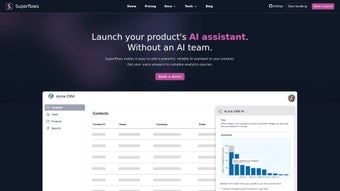
Superflows is an AI‑driven tool purpose‑built for SaaS companies that want to turn complex analytics into conversational experiences. Rather than relying on static dashboards or generic chatbots, Superflows lets end‑users ask natural‑language questions about their product data, and the platform fetches the exact metrics through your existing product APIs. The result is a seamless, interactive assistant that not only explains data but can also execute actions on behalf of the user—such as creating a new report, tagging a customer, or triggering a workflow—while preserving full control and auditability. By embedding a single line of code, product teams can customize answer formats, maintain brand voice, and collect real‑time feedback without hiring an in‑house AI team. Superflows promises a secure, scalable, and continuously updated experience that boosts user engagement, shortens the time‑to‑insight, and ultimately drives higher retention for SaaS products.
Core Features & Benefits
- Natural‑Language Analytics Queries: Users type or speak queries like “What was our churn rate last month?” and receive instant, chart‑ready answers.
- Actionable AI Assistant: Beyond insights, Superflows can perform tasks (e.g., create a segment, send a notification) directly from the conversation.
- API‑First Integration: Connect to any product data source via a simple code snippet; the tool calls your existing endpoints securely.
- Customizable Response Templates: Match the tone, style, and data presentation to your product’s UI/UX guidelines.
- Feedback Loop & Continuous Learning: Capture user satisfaction scores and query refinements to improve model accuracy over time.
- Role‑Based Access Control: Ensure that only authorized users can trigger sensitive actions or view privileged data.
- Multi‑Channel Deployment: Embed in web apps, mobile apps, or even third‑party platforms like Slack or Microsoft Teams.
- Security & Compliance: Data never leaves your environment; Superflows respects GDPR, CCPA, and SOC 2 standards.
The benefits of these features translate into measurable business outcomes. Teams report up to a 40 % reduction in time spent navigating dashboards, while end‑users enjoy a more engaging product experience that feels “intelligent” rather than “static.” Because Superflows handles the heavy lifting of data retrieval and action execution, product managers can focus on building core features instead of maintaining a separate analytics team. The AI model is continuously updated by the Superflows team, meaning you receive the latest language understanding improvements without additional deployment overhead.
Installation, Usage & Compatibility
Step‑by‑Step Installation
- Create an account: Sign up on the Superflows website using your SaaS company email.
- Generate an API key: After verifying your domain, obtain a unique token that will authenticate all requests.
- Insert the code snippet: Paste the provided JavaScript (for web) or native SDK (for iOS/Android) into your application’s entry point. The snippet automatically loads the AI engine and establishes a secure channel to your backend.
- Map your data endpoints: In the Superflows dashboard, define the product APIs that will answer queries (e.g.,
/metrics/churn,/users/active). Use the visual mapper to link query intents to endpoint parameters. - Configure response templates: Choose from pre‑built UI cards, tables, or custom HTML blocks to present answers consistently with your product’s design system.
- Test and launch: Use the sandbox console to simulate user queries, validate action permissions, and fine‑tune language handling before going live.
Operating System Support
Superflows is built as a cross‑platform solution. The web SDK works on any modern browser (Chrome, Edge, Firefox, Safari) on Windows, macOS, or Linux. For mobile, native iOS (Swift) and Android (Kotlin) SDKs are available, ensuring low‑latency performance on smartphones and tablets. The backend API is language‑agnostic, so you can integrate with services written in Node.js, Python, Ruby, Java, or Go.
Daily Usage Tips
Once installed, end‑users can invoke Superflows via a persistent chat icon, a keyboard shortcut, or an embedded “Ask me anything” widget on the analytics page. Encourage users to start with simple queries and gradually explore more complex multi‑step actions. Administrators should monitor the usage analytics panel to identify high‑frequency questions and expand the underlying data endpoints accordingly. Remember to regularly review the permission matrix to keep action triggers aligned with evolving security policies.
Pros, Cons, FAQ & Final Verdict
Pros & Cons
- Pros:
- Instant, conversational access to real‑time analytics.
- Actionable AI that can perform tasks without leaving the chat.
- Zero‑code customization for response formatting.
- Strong security and compliance posture.
- Scalable across web, iOS, Android, and enterprise chat platforms.
- Cons:
- Initial setup requires mapping of product APIs, which may need developer time.
- Complex queries may need iterative refinement of intent mappings.
- Pricing is subscription‑based; smaller startups might find the cost higher than a DIY chatbot.
Frequently Asked Questions
Is Superflows GDPR‑compliant?
Yes. All data processing occurs within your infrastructure, and Superflows provides data‑subject request tools to help you meet GDPR obligations.
Can I use Superflows with my existing BI tools?
Absolutely. Superflows can call any RESTful endpoint, so you can expose metrics from Looker, Tableau, or Power BI as API resources that the assistant will consume.
What pricing plans are available?
Superflows offers a tiered subscription model: Starter (up to 5,000 queries/month), Growth (up to 50,000 queries), and Enterprise (unlimited). All plans include SLA‑backed uptime and priority support.
Do I need an AI specialist to maintain the assistant?
No. Superflows manages model updates and provides a visual intent mapper, so product teams can adjust queries without deep AI expertise.
How does Superflows handle security for action triggers?
All action requests are routed through your API with OAuth 2.0 tokens. You can define granular scopes, ensuring the assistant can only execute pre‑approved operations.
Conclusion & Call to Action
In a market where data overload can paralyze decision‑making, Superflows stands out as a practical, secure, and highly configurable AI companion for SaaS products. Its ability to translate natural language into precise analytics, coupled with the power to act on behalf of users, delivers a tangible boost to both user satisfaction and internal efficiency. While the initial API mapping requires a modest developer investment, the long‑term payoff—faster insights, reduced support tickets, and higher product stickiness—makes the trade‑off worthwhile. If you’re ready to modernize your analytics experience, eliminate the need for a dedicated AI squad, and give your users a truly interactive interface, download Superflows today and start the free trial. Let the conversation begin.



.png)



